
Play FreeCell Solitaire Online for Free
Unlike other types of solitaire, nearly every game of FreeCell is winnable. And since all the cards are face up, you can plan ahead, making this a good option for strategic thinkers.
See how you compare on the leaderboard.
FreeCell Solitaire by the Numbers
Here’s how FreeCell games on SolitaireStreak have gone so far.
- 58%of games wongames won
- 3:54typical winning timetypical win
- 104moves in a typical wintypical moves
With every card face up, FreeCell is won far more often than Klondike. Players win 34% of Klondike (Turn 1) games.
Based on 473 games played on SolitaireStreak since November 9, 2026. Updated daily.
FreeCell Objective
Win FreeCell Solitaire by moving all 52 cards to the four foundation piles, building each one up by suit from Ace to King.
Each game starts with all 52 cards dealt face up into eight tableau columns: seven cards in each of the first four columns and six in each of the last four. Above the tableau are four free cells and four empty foundation piles. There’s no stockpile.
FreeCell Rules
The rules of FreeCell are simple, but with no stockpile to draw from, your only spare room is the four free cells and any empty columns you create. How you use that space decides the game. A single card placement can open up opportunities or block essential moves, so it pays to think a few steps ahead.
- Play cards to the foundation piles in ascending order, separated by suit. Each foundation starts with an Ace and builds up to the King (A♠, 2♠, 3♠, and so on). It’s important to locate and free the Aces early so you can progress in the game.
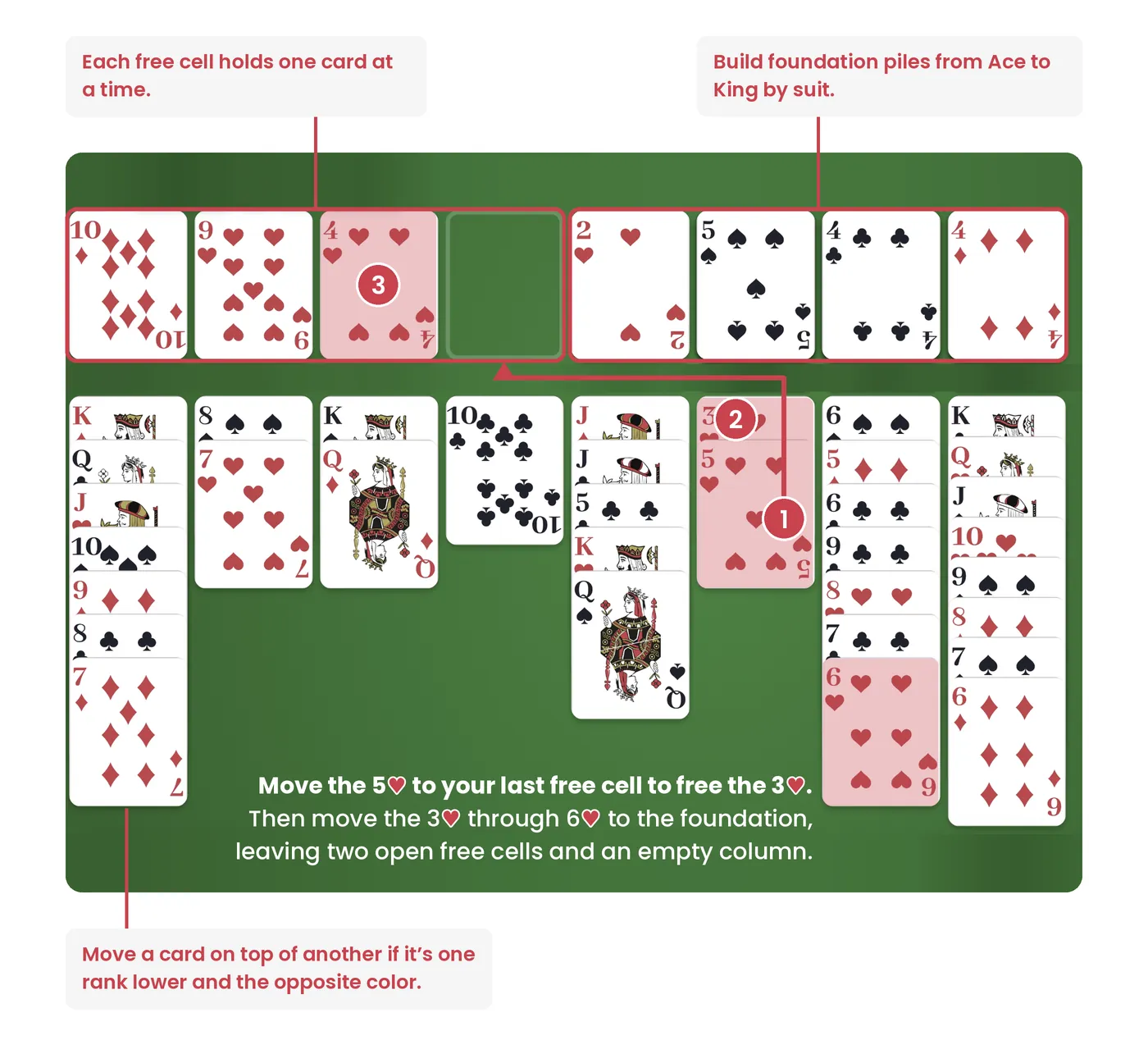
- In the tableau, sequence cards in descending order and alternating color. Each card you add to a column must be one rank lower and the opposite color. For example, a 9♠ can go on a 10♥.
- You can place any card in an empty free cell, as needed. Each free cell holds one card at a time. You can play a card from a free cell back to the tableau or up to a foundation whenever it fits.
- The amount of cards you can move as a group depends on how many open free cells are available. You can move as many cards as you have open free cells, plus one. So if you have three open free cells, you can move four cards at a time. Each empty column doubles that number, as long as you aren’t moving the sequence into that empty column. With four open free cells and one empty column you can move up to 10 cards.
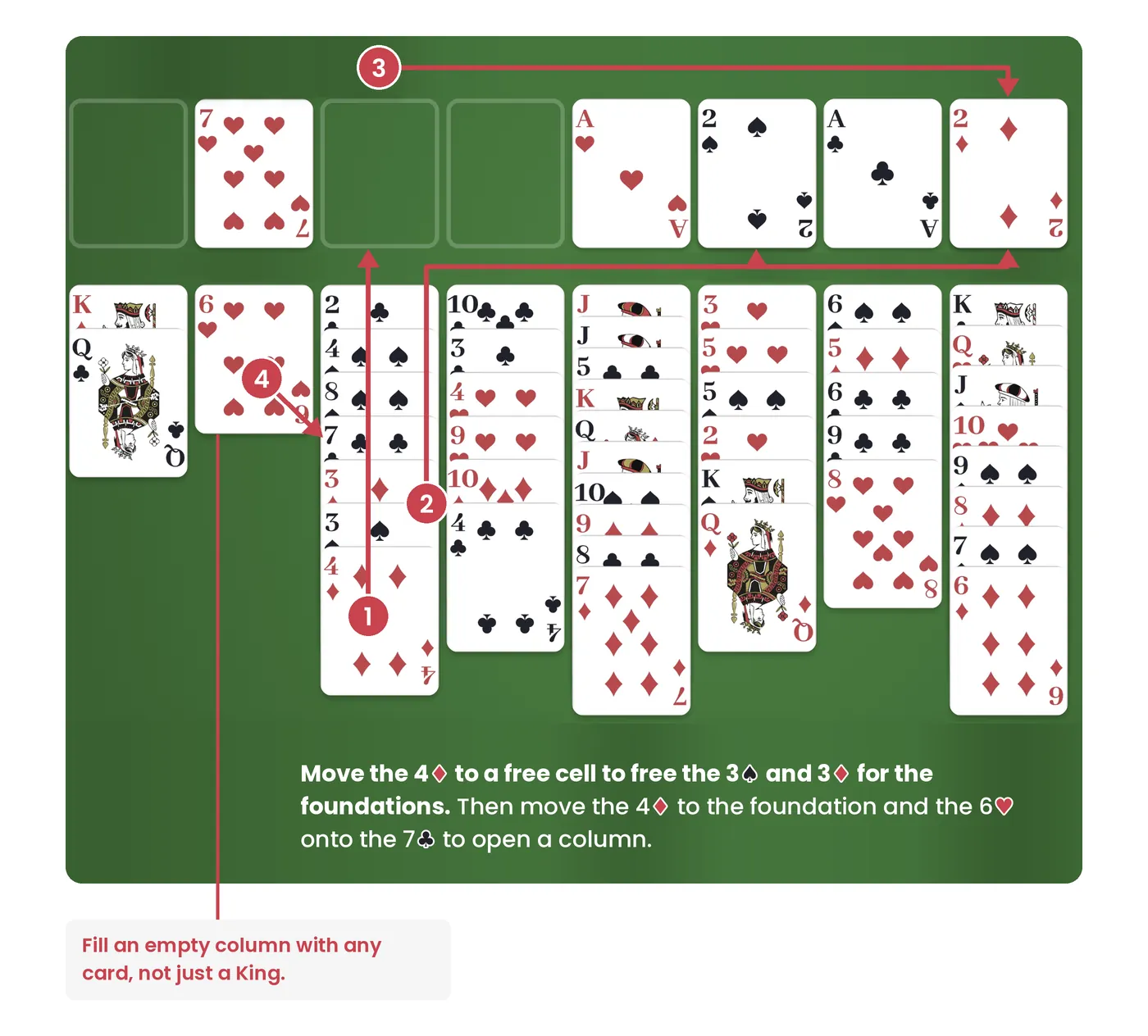
- Fill an empty column with any card or any valid descending sequence. Unlike Klondike, an empty column doesn’t need to start with a King.
The game is won when the last King lands on its foundation. If every free cell is full and no legal moves are left, you’re stuck. Replay the deal by pressing the Restart button or try a different deal by pressing New Game. Every deal can be won. Each one is solved by a computer before it’s dealt.
FreeCell uses a single deck, just like traditional Klondike Solitaire, but it trades the stockpile for four free cells and lets any card fill an empty column. Our FreeCell vs. Solitaire guide breaks down the differences.
Tips and Strategies to Win FreeCell
In FreeCell, open space is your most valuable resource. Use these FreeCell strategies to get more out of your free cells and win more games.
- Study the board before your first move. Before you touch a card, find the Aces and 2s and count how many cards sit on top of each one. The least-buried ones are usually the fastest to free, and a minute of planning can save you a stuck game later. Plus, the timer doesn’t start until you click or drag your first card.
- Free your Aces and low cards first. Aces and 2s can go straight to the foundations and allow you to start building your foundation piles to win the game.
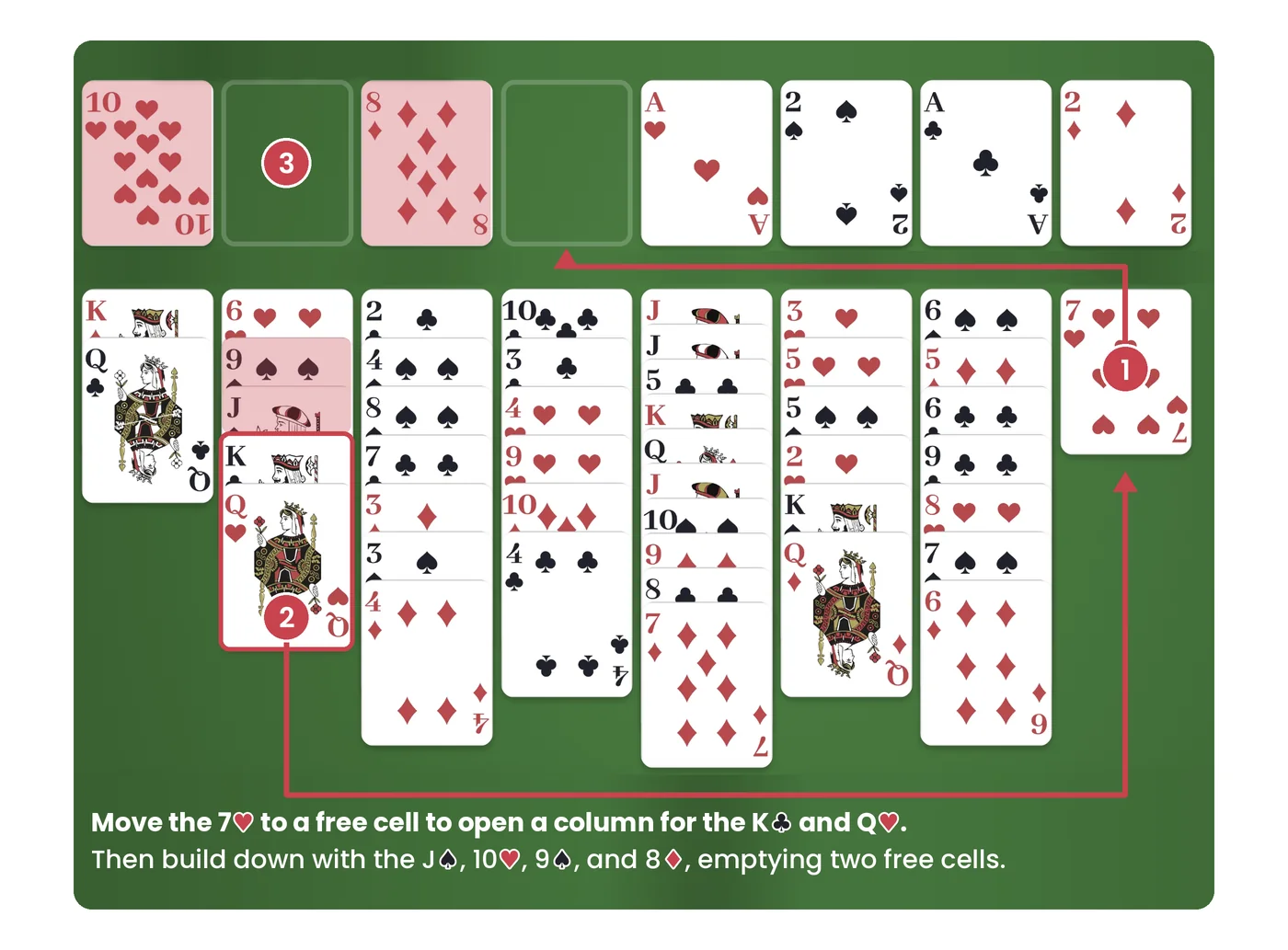
- Keep your free cells open. Free cells are your most flexible space, but there are only four of them. Every card you place cuts down how many cards you can move at once, so only use a free cell when it leads to a clear next step and have a plan to move a card in a free cell back to the tableau. It’s easy to get stuck if all the free cells are filled.
- Focus on emptying columns to give yourself more flexibility. An empty column can hold a whole sequence, not just one card, and it doubles the number of cards you can move. Clearing a short column early is often worth a few extra moves.
- Avoid building long sequences on top of cards you need to access. A long sequence is only useful if you have the space to move it later. If you don’t, it can block the low cards underneath.
- Don’t rush cards to the foundations. A card in the tableau can still hold a lower card of the opposite color. Move cards up once you no longer need them as places to build.
Customize Your FreeCell Game on SolitaireStreak
You can set up FreeCell on SolitaireStreak to match the way you like to play. Most of these options are under Options > Settings.
- Drag or click cards: Click-to-move is on by default, so a single click sends a card to its allowed spot. For more control, you can also drag a single card or a whole sequence to place it exactly where you want. To turn off Click-to-move, go to Options > Settings > Game Options.
- Choose when to autocomplete: By default, Autocomplete moves the remaining cards to the foundations once the game is won. You can also set it to play obvious moves as they come up, or turn it off and place every card yourself.
- Change the look and sound: Pick a classic or modern card design, choose a card back, and change the background color. Sound effects and animations can be turned on or off, too.
- Save your stats: Create a free account to keep your stats, track personal bests like your fastest win and fewest moves, and compete on the leaderboard.
Each deal is a new puzzle with a solution waiting to be found. Deal a new game and see if you can top our leaderboard.